ConvenienceCast Digital Signage

Put Every Screen in Your Store to Work.

Purpose-built for convenience stores and more.

Show 8–72 scratch-off tickets, run video or image playlists, or use both from one simple Windows dashboard.

NEW Media Manager
8–72 ticket layouts
Auto image numbering
Click to replace image
Up to 15 promo displays
No monthly subscription
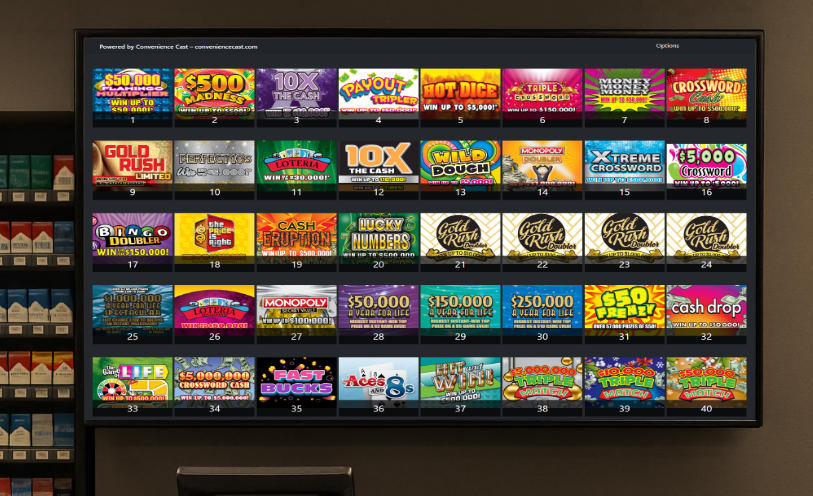
ConvenienceCast digital signage displays in a convenience store
8–72LottoCast ticket layouts
4–15Independent PromoCast displays
Video or ImagesFlexible promotional playlists
$0/monthOne-time software licenses

One release · Two stronger products

Built around the screens and routines your store already uses.

Version 3.2.0 focuses on practical improvements: show more, use the available TV space better, and update content with less friction.

LottoCast 3.2.0

More tickets without wasting the screen.

Choose the ticket count your store needs and let LottoCast fit the grid to the available TV space.

  • Display anywhere from 8 to 72 numbered scratch-off tickets.
  • Screen-aware layouts resize and balance themselves automatically.
  • Use local PNG or JPG files or an optional public HTTPS image folder.
  • Customizable display tiles keep partial rows balanced and polished.
  • Choose a Light or Charcoal casting background independently of the dashboard theme.
Explore LottoCast

PromoCast 3.2.0

Run motion when you want it. Sharp images when you don’t.

Each PromoCast display can use its own numbered video playlist or image playlist.

  • Choose Video or Image Playlists independently for each display.
  • Set how long each image stays on screen: 5, 10, 15, 20, 30, or 60 seconds.
  • Use PNG, JPG, JPEG, or WebP image artwork.
  • Start with four ready-to-use displays and expand up to 15 at no additional cost.
  • Enable local weather only on the displays where you want it.
Explore PromoCast

LottoCast

Every ticket, clear and easy to find.

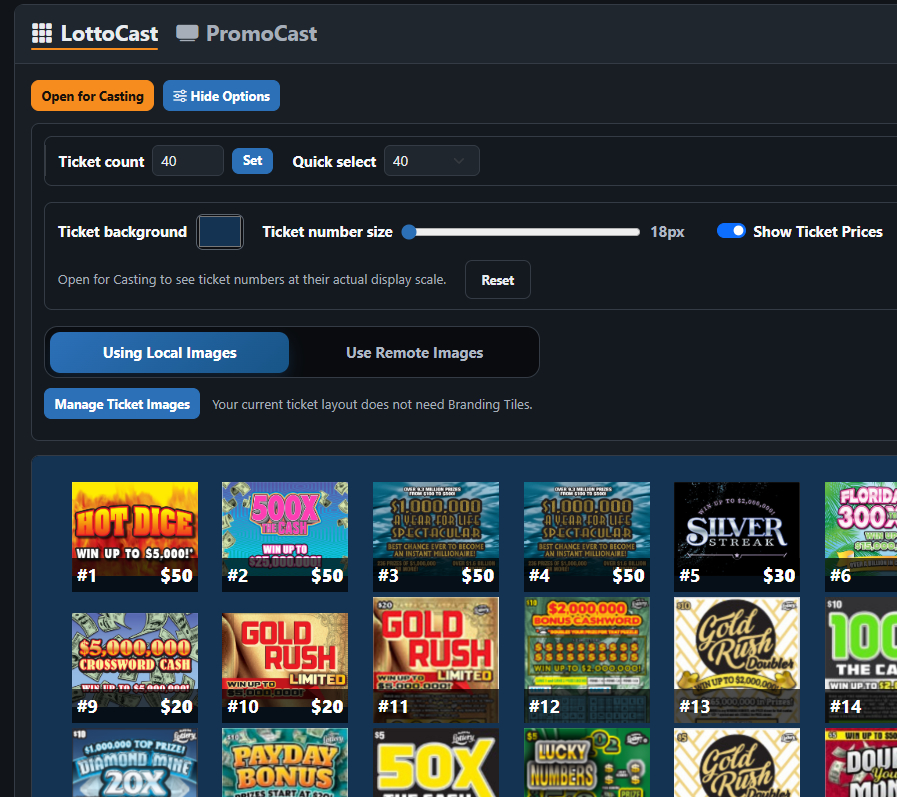
Turn a standard TV into a sharp, automatically numbered scratch-off display. Choose the count your store needs and let LottoCast fit the grid to the screen.

  • Display 8–72 tickets and keep a full 72-image library ready
  • Click any ticket position to replace its image
  • Add prices, mark new games, and adjust ticket-number size
  • Use Branding Tiles for store logos, promotions, or upcoming games
  • Choose local ticket images or an optional compatible remote folder
LottoCast numbered scratch-off ticket display
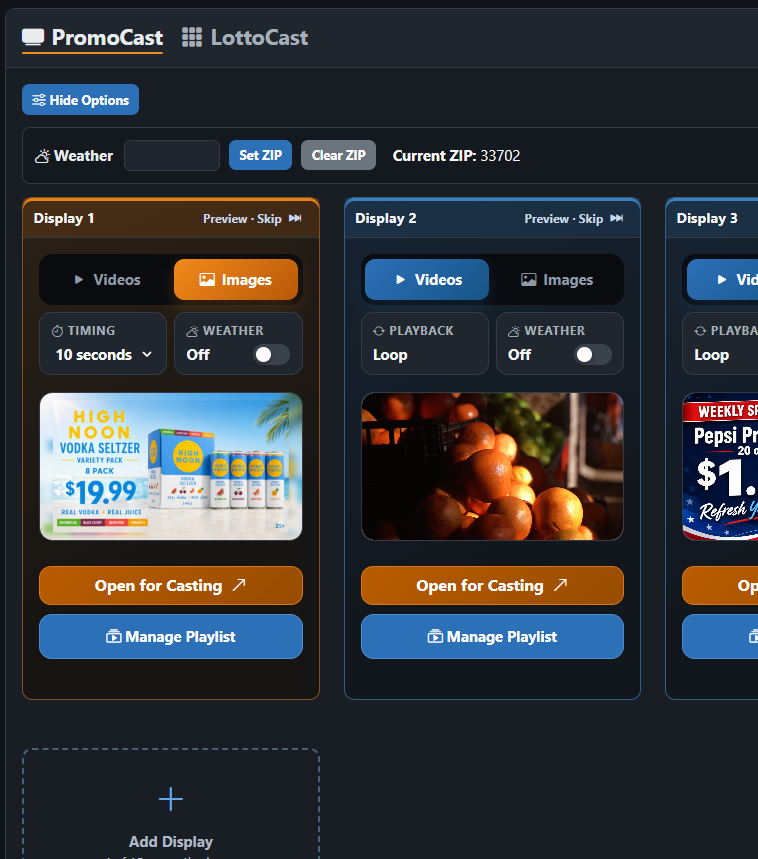
PromoCast promotional display controls

PromoCast

Put every promotional screen to work.

Give each display its own video or image playlist. Start with four screens and add more from the dashboard whenever you need them—up to 15.

  • Choose video or image playback independently for every display
  • Preview media and drag it into playback order
  • Set image timing and optional local weather per screen
  • Save playlist changes with automatic safety backups
  • Keep direct access to ordinary Windows media folders

New in ConvenienceCast 3.2

Change your mind. Change your media.

Keep your store’s screens as dynamic as your business. Media Manager brings LottoCast and every PromoCast display into one streamlined workspace. Preview what’s playing, update ticket images, manage video or image playlists, and refresh every screen with confidence—all in just a few clicks.

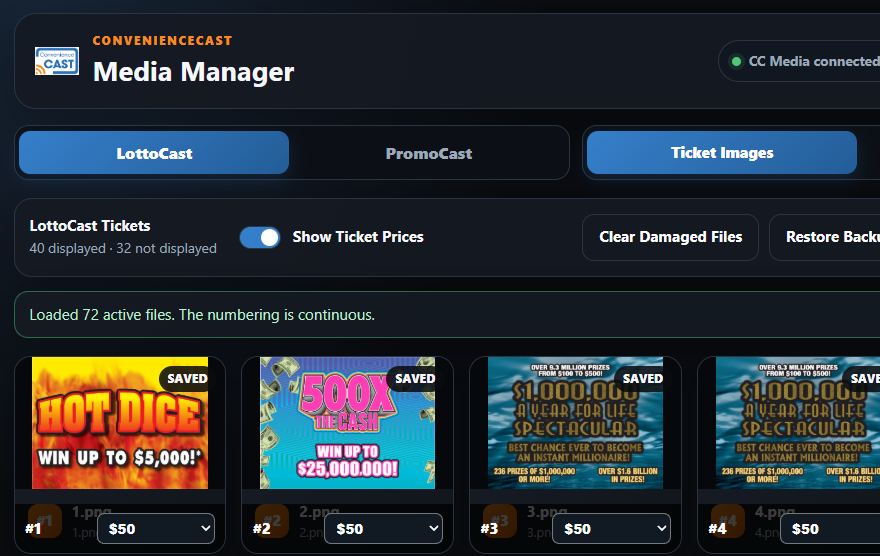
Click a LottoCast ticket to replace it
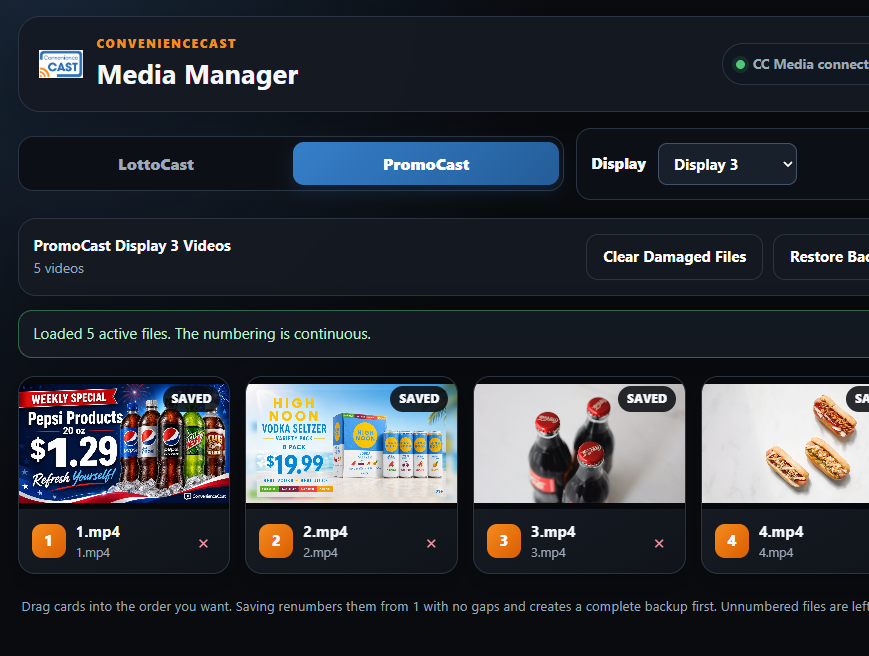
Drag PromoCast media into playback order
Automatic backups before saved changes
Clear damaged or duplicate media safely
ConvenienceCast Media Manager showing a PromoCast playlist
LottoCast ticket images in ConvenienceCast Media Manager

Simple changes. Built-in protection.

Make updates without the busywork.

  1. Instant Updates: Click any LottoCast ticket to replace its image, or drag displayed tickets into a new order.
  2. Simple Playlist Controls: Preview PromoCast media and drag videos or images into the playback order you want.
  3. Built-In Safety: Automatic backups protect your media before changes are saved, while damaged or alternate files can be moved aside without disrupting the active playlist.

One-Time Pricing, No Subscriptions

Start with LottoCast, put PromoCast to work, or bring both together for complete in-store impact.

LottoCast
$600

Display 8–72 scratch-off tickets in a clear, numbered grid.

One-time license for the purchased version. No monthly subscription.

Buy LottoCast
PromoCast
$600

Turn store TVs into looping promotional displays. Start with 4 and expand up to 15—at no additional cost.

One-time license for the purchased version. No monthly subscription.

Buy PromoCast

Designed for Windows PCs using Chrome and compatible TV casting. Add your own ticket images and promotional media. Internet is used for installation, activation, and periodic license verification. Future feature upgrades may be sold separately. Secure checkout is provided by Stripe.

See ConvenienceCast in Action

Tell us about your store and we’ll help you choose the right ConvenienceCast option.
See ConvenienceCast in Your Store

Tell us about your store, your screens, and what you want to display. We’ll schedule a personalized walkthrough and show you how LottoCast, PromoCast, or both can work in your location.

For an in-store walkthrough, you’ll need a TV with an available HDMI input.

ConvenienceCast Media Manager showing a promotional playlist

Contact Info

Choose a product.

Schedule your walkthrough